Saturday, January 2, 2016

Port


Port


1.In computer networking, a port is an endpoint of communication in an operating system. While the term is also used for hardware devices, in software it is a logical construct that identifies a specific process or a type of service.
A port is always associated with an IP address of a host and the protocol type of the communication, and thus completes the destination or origination address of a communications session. A port is identified for each address and protocol by a 16-bit number, commonly known as the port number.

2.In programming, a port (noun) is a "logical connection place" and specifically, using the Internet's protocol, TCP/IP, the way a client program specifies a particular server program on a computer in a network. Higher-level applications that use TCP/IP such as the Web protocol, Hypertext Transfer Protocol, have ports with preassigned numbers. These are known as "well-known ports" that have been assigned by the Internet Assigned Numbers Authority (IANA). Other application processes are given port numbers dynamically for each connection. When a service (server program) initially is started, it is said to bind to its designated port number. As any client program wants to use that server, it also must request to bind to the designated port number.
Port numbers are from 0 to 65535. Ports 0 to 1024 are reserved for use by certain privileged services. For the HTTP service, port 80 is defined as a default and it does not have to be specified in the Uniform Resource Locator (URL).
http://searchnetworking.techtarget.com/definition/port


Sunday, August 23, 2015

Web Scraping in Python


WebScraping

  Overview

Python provides a wealth of tools for scraping data off the web. Below are some resources to help get you started.

Modules

HTTP Requests

The first step in scraping is making an HTTP request. Below are some useful libraries for fetching data over the Web.
  • urrlib - the traditional (no frills) library for making HTTP requests. This library comes pre-packaged with Python
  • httplib2 - "A comprehensive HTTP client library that supports many features left out of other HTTP libraries."
  • mechanize - a stateful web crawler (similar to process of stepping through a website with a browser).
  • requests - A newer library that provides a very clean, intuitive interface for making HTTP requests.
  • scrapelib - Created by the Sunlight Foundation, this library bakes in caching, ftp downloads, and other goodies.

HTML/XML Parsing

The second step after downloading your data is parsing it. Below are some libraries that parse HTML and provide an easy API for extracting elements.
  • BeautifulSoup - A traditional favorite among scrapers for HTML parsing. Not as feature-rich as lxml, but often gets the job done. A good first library to start with.
  • html5lib
  • lxml - a robust library that supports multiple HTML/XML parser types, and provides advanced features such as extracting page elements using CSS selectors

Scraping Frameworks

  • scrapy - "an application framework for crawling web sites and extracting structured data" (packages together the request and scraping bits)

Tutorials


Enhanced by Zemanta

Thursday, April 2, 2015

THREAD

               A thread is a single sequential flow of control within a program.

 With respect to computer programming, a thread is a portion of code that may be executed independently of the main program. 

EXAMPLE
A program may have an open thread waiting for a specific event to occur or running a separate job, allowing the main program to perform other tasks. A program is capable of having multiple threads open at once and will either terminate or suspend them after a task is completed, or the program is closed.

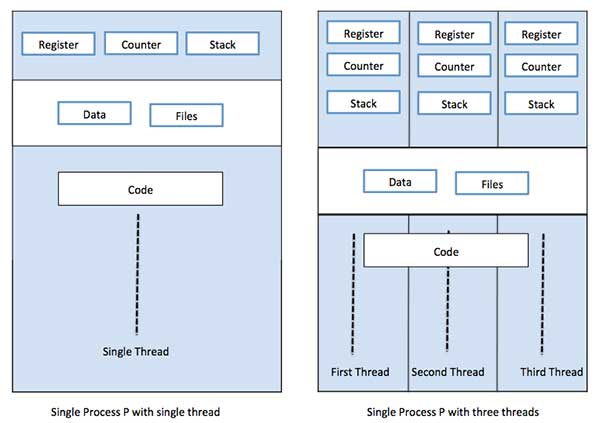
     A thread is a flow of execution through the process code, with its own program counter, system registers and stack. A thread is also called a light weight process. Threads provide a way to improve application performance through parallelism. Threads represent a software approach to improving performance of operating system by reducing the overhead thread is equivalent to a classical process.
         A thread of execution is the smallest sequence of programmed instructions that can be managed independently by a scheduler, a thread is a component of a process. Multiple threads can exist within the same process and share resources such as memory, while different processes do not share these resources.

  1. Difference between Thread and Process
    Threads differ from traditional multitasking operating system processes in that:
    • processes are typically independent, while threads exist as subsets of a process
    • processes carry considerably more state information than threads, whereas multiple threads within a process share process state as well as memory and other resources
    • processes have separate address spaces, whereas threads share their address space
    • processes interact only through system-provided inter-process communication mechanisms
    • context switching between threads in the same process is typically faster than context switching between processes.
    MULTITHREADING

         Multithreading is the ability of a program or an operating system to serve more than one user at a time and to manage multiple simultaneous requests without the need to have multiple copies of the programs running within the computer. To support this, central processing units have hardware support to efficiently execute multiple threads. This approach is distinguished from multiprocessing systems (such as multi-core systems) in that the threads have to share the resources of a single core: the computing units, theCPU caches and the translation lookaside buffer (TLB).

    Where multiprocessing systems include multiple complete processing units, multithreading aims to increase utilization of a single core by using thread-level as well as instruction-level parallelism. As the two techniques are complementary, they are sometimes combined in systems with multiple multithreading CPUs and in CPUs with multiple multithreading cores.
    One example of multithreading is downloading a video while playing it at the same time. Multithreading is also used extensively in computer-generated animation.
    Among the widely-used programming languages that allow developers to work on threads in their program source code are Java, Python and .NET.

  2.                           Image result for multithreading

  3. REFRENCES
  4. http://en.wikipedia.org/wiki/Multithreading_(computer_architecture)


Sunday, March 29, 2015


FEW BASIC CONCEPTS

FEW BASIC CONCEPTS DEFINITION

                               Image result for basic computer concepts definitions
Bit 
The smallest piece of information used by the computer. Derived from "binary digit".   In computer language, either a one (1) or a zero (0).

Backup 
A copy of a file or disk you make for archiving purposes.

Bus 
An electronic pathway through which data is transmitted between components in a computer.

Byte 
A piece of computer information made up of eight bits.

Copy / Paste 
Is the process of selecting text, pictures or files and the copying the selection to the clipboard (temporary storage area). The information is then pasted into the new location such as a different directory for files or a different section of a document for text.

Browser 
A browser is used to surf the Internet. The most popular or well known browser is Internet Explorer but there are Chrome, Firefox and Opera also. A browser is used to display web pages and web sites from the Internet.

Directory 
A directory is a location where you store your files. There are a default set of directories that are created when the computer is setup and when software is installed. To make the saving and retrieval of files easier by creating you own directories (or directory structure) to store the files that you create. 

Web Page 
A web page is a single page of information that is located on the on the Internet. The page may display text, pictures or be interactive such a game.

Web Site 
A web site is a collection of web pages that all relate to each other. For example,  google.com is a web site and the PC Advice Home Page is a web page that is part of the site.

Friday, March 27, 2015

BIT

     bit is the smallest unit of information that can be stored or manipulated on a computer.
          
       It consists of either zero or one. Depending on meaning, implication, or even style, it could instead be described as false/true, off/on, no/yes, and so on. We can also call a bit a binary digit, especially when working with the 0 or 1 values.
                                   Image result for bit bytes
                         

BYTE

    Although computers usually provide instructions that can test and manipulate bits, they generally are designed to store data and execute instructions in bit multiples called bytes. In most computer systems, there are eight bits in a byte. The value of a bit is usually stored as either above or below a designated level of electrical charge in a single capacitor within a memory device.
          A byte also happens to be how many bits are needed to represent letters of the alphabet and other characters. For example, the letter "A" would be 01000001; my initials "KJW" would be010010110100101001010111. To make this a little bit easier to see where the bytes are it is customary place a comma every four digits, to make what are sometimes called nibbles:0100,1011,0100,1010,0101,0111. That's not really much easier for people to read or write--and many computer engineers, programmers, and analysts need to read and write even longer binary codes than this.
It so happens that there are only 16 different ways to write 0's and 1's four times. So something called hexademical code can be used to make the numbers shorter by translating each nibble (or half-a-byte) like this:
Binary: 
0000
0001
0010
0011
0100
0101
0110
0111
1000
1001
1010
1011
1100
1101
1110
1111
Hexademical: 
0
1
2
3
4
5
6
7
8
9
A
B
C
D
E
F

Nibble
Half a byte (four bits) is called a nibble.
Units of Data Measurement
                                   
  DIFFERENCE BETWEEN BIT AND BYTES
The terms "bits" and "bytes" are often confused and are even used interchangeably since they sound similar and are both abbreviated with the letter "B." However, when written correctly, bits are abbreviated with a lowercase "b," while bytes are abbreviated with a capital "B." It is important not to confuse these two terms, since any measurement in bytes contains eight times as many bits. For example a small textfile that is 4 KB in size contains 4,000 bytes, or 32,000 bits.
Generally, files, storage devices, and storage capacity are measured in bytes, while data transfer rates are measured in bits. For instance, an SSD may have a storage capacity of 240 GB, while a download may transfer at 10 Mbps. Additionally, bits are also used to describe processor architecture, such as a 32-bit or 64-bit processor.
     For example in Internet Protocol (IP) networking, IP addresses contain 32 bits or 4 bytes. The bits encode the network address so that it can be shared on the network. The bytes divide the bits into groups.
The IP address 192.168.0.1, for instance, is encoded with the following bits and bytes:
11000000 10101000 00000000 00000001.
    Bits are grouped into bytes to, generally speaking, increase the efficiency of computer hardware,including network equipment, disks and memory.

 REFRENCES
http://computer.howstuffworks.com/bytes1.htm


Thursday, March 26, 2015

Checksum


CHECKSUM

        A simple error-detection scheme in which each transmitted message is accompanied by a numerical value based on the number of set bits in the message.
  1. A checksum or hash sum is a small-size datum from an arbitrary block of digital data for the purpose of detecting errors which may have been introduced during its transmission or storage. It is usually applied to an installation file after it is received from the download server.
    A checksum or hash sum is a small-size datum from an arbitrary block of digital data for the purpose of detecting errors which may have been introduced during its transmission or storage.  (According toWikipedia)
    The actual procedure which yields the checksum, given a data input is called a checksum function or checksum algorithm.